Battery setup on the VControl Touch
New Battery

Once your battery telemetry wire is hooked up and the helicopter is powered up, the VControl will ask for a battery. Select New battery.
Default Battery
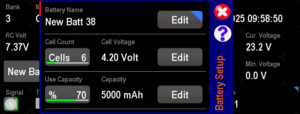
The Battery Setup screen will show with some defaults.
Battery Name

The first thing to do is set the new battery name, I normally go with this style, which is “Brand Size Cells Number”.
Brand Size Cells allows me to recognize the pack, and the number is just so I can track cycles. On the times I’ve not put a number, I’ve always regretted it, as when you get another pack, i.e. 2, it looks weird in the logs.
I also write the number on the pack with a marker, or white tape and marker, so I can’t get battery selection wrong.
Cell Count and Voltage

The Cell Count and Voltage will default according to the voltage it sees. If you’re using a fully charged pack the Cells may default to something higher than actual, so double-check that the right values are selected.
Use Capacity
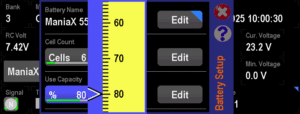
I normally set Use Capacity to 80% and never touch it, however, there are 2 schools of thought on this. More info in the Battery Calibration step.
Capacity
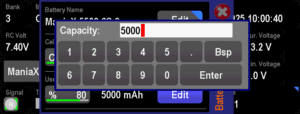
I set my capacity to about 20% lower than the battery marked capacity, to allow for some calibration flights.
Battery Calibration
The battery usage by various ESCs are all slightly different. Most are pretty consistent, but there will always be a difference between the actual and calculated. So how how to we manage that? There are a few schools of thought on that as far as I’ve seen.
The one I use is to change the capacity to match the flight usage. So I’ll start flying a new pack as something smaller, e.g. 4500 where the pack is actually a 5500. After each flight I’ll check the end voltage of the pack, and adjust the capacity until I’m getting my alerts and landing exactly where I want it to be. Once it’s calibrated you won’t need to adjust it again, but I do keep an eye on the end voltage, as it’s an indicator to whether the pack is aging and capacity is reduced.
Another popular way is to set the capacity to match what the battery is marked as, e.g. 5500, or what the available capacity is when tested by cycling on the charger, and set the Use Percentage value to land at the right time. So set the initial Use Capacity to 60%, and then over the calibration flights, move that up to where you’re landing at the right end voltage.
Another method I’ve heard of, but not tried, is to rely purely on Voltage Alarms and Sampling Time, which we’ll talk about further down.
Page 2 of Battery setup
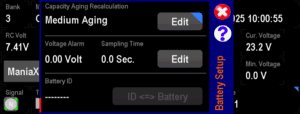
In case you hadn’t figured it out, there is a 2nd page in the Battery Setup screen. Scroll down to see it.
Capacity Aging Recalculation

The VControl can automatically reduce the capacity of the battery according to the age and flight count. This is an interesting feature and I’m sure many pilots use it successfully, but I tend to stay away from it for 2 reasons.
The 1st is that I don’t think the aging matches what’s actually happening to the battery. I prefer to keep my eye on the end voltages before I unplug the helicopter, and if the voltage is higher or lower than I’d like, I change the capacity.
The 2nd is there have been some reports of it doing weird things to the capacity, where batteries have had the capacity changed to huge values. Mikado claim it can’t happen, but I’ve heard a few reports of it, and it makes sense. If the VControl is continually modifying that value, and perhaps it goes to negative, or the date resets, it can mess it up. So I say thanks, but no thanks. I’ll do my own battery monitoring.
Voltage Alarm and Sampling Time.

For a new LiPo, I set my Alarm Threshold to 3.5v and Sampling Time to 2 seconds.
The warning voltage is a little high, as during a 3D flight it will sag lower than that and trigger the alert, but I like to play it safe until the battery is calibrated.
As the battery is broken in and settles into its daily usage, I find I need to drop the voltage a bit, normally down to about 3.4v to get a decent flight without warnings.
As a pack gets older, the Internal Resistance (IR) goes up and the capacity drops, the warnings will come earlier and earlier. So you need to drop this as the pack ages.
Once the warning voltage reaches 3.3v, the pack is basically done. Good for summer flying when its warm, or giving to a fellow pilot who doesn’t fly as hard, is a good way to keep them useful.
Top 5 Batteries

I use the Top 5 Batteries screen so that it only shows me the batteries that are relevant to the helicopter. This makes it way easier than choosing from all your batteries. Usefully, the batteries are ordered by last used instead of by name, so you normally select from the bottom when cycling through your packs.
It can be turned on in the Battery Settings screen.
Model Screen
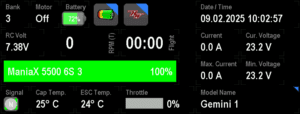
This is generally what my Model Screen looks like. I have all the information I need, including the current and end voltages, current and max current, flight time and temperatures.
I have these saved as screens for HobbyWing, YGE and Scorpion, so whenever I bind to a model with one of those ESCs, I can just select the right screen.
Talking Switches
As an aside, I also use the VControl Pro App called Talking Switches.
I normally have this set up to read out RPM, Current and Throttle output, as I find these are the most useful for finding out how the helicopter is performing.